Barracuda Backup Vx Virtual Appliance
Easy Cloud-Connected Backup


 Barracuda Backup Overview:
Barracuda Backup is the unified, cost-effective data protection solution for your physical, virtual, and SaaS environments: A complete backup solution with remote storage that is easy to buy, install, and manage.
The Barracuda Advantage
- Virtual backup appliance that can be deployed in virtual environments to leverage existing infrastructures.
- Simple per-socket or per-server pricing.
- Backup software and integrated remote replication.
- Cloud-based central management for seamless multisite administration.
- Rapid local or remote recovery, preventing data loss and minimizing down time.
Product Spotlight
- Built-in cloud and site-to-site replication prevent data loss in case of disaster.
- LiveBoot and Cloud LiveBoot enable rapid recovery of VMware and Microsoft Hyper-V virtual machines in minutes.
- Offsite vaulting of historical revisions frees up valuable space on local storage.
- Optimizes storage and bandwidth requirements with compression and deduplication
- Scalable performance means you can easily add more resources to enable more simultaneous backup processes
Physical and VirtualMost businesses today have a mixed environment of physical and virtual servers. Barracuda Backup Vx is a single solution that protects physical servers and virtual machines (VMware & Hyper-V) with snapshot and granular file recovery—all with unified management for replication and retention. |
|
Virtual ApplianceBarracuda Backup Vx can be deployed in virtual environments to leverage all your existing compute and storage infrastructures, while optimizing local storage and bandwidth requirements. |
|
Flexible DeploymentBarracuda Cloud Storage, Cloud Control and Cloud LiveBoot recovery allow simple remote replication, seamless multisite administration, and rapid access to virtual machines during site disasters. Site-to-site replication and Local LiveBoot recovery allow complete protection for those operating in private environments or deploying private cloud technologies. |
Streamline Backup with Integrated Software, Appliance, and Cloud for Storage Efficiency and Fast Restores
Barracuda Backup is a unified, cost-effective data protection solution for protecting physical, virtual, and SaaS environments. Simple to deploy and easy to manage, Barracuda Backup supports scalable retention and offsite disaster recovery to the Barracuda Cloud with Unlimited Cloud Storage or between sites for private replication.
With an extensive range of supported environments and integration with CudaDrive cloud file services to provide end-user access in a disaster, organizations can replace multi-vendor solutions with Barracuda Backup. Barracuda Backup can be deployed as a purpose built backup appliance or a virtual appliance for organizations that prefer to use existing hardware.
Protect your SaaS and Cloud-hosted Environments
SaaS is a great option for companies wanting highly scalable and redundant architectures to mitigate natural and mechanical failures, however there are inherent risks associated with cloud-hosted data. Human-caused data loss – be it intentional or accidental still exists as data can still be permanently deleted from cloud applications. Barracuda Cloud-to-Cloud Backup protects businesses against data loss and accidental deletion in Microsoft Office 365.
Available as either a standalone service or as a part of your Barracuda Backup solution, Cloud-to-Cloud Backup for Microsoft Office 365 is included for the first year at no additional charge for new and existing customers with subscriptions to Barracuda Backup Unlimited Cloud Storage or Backup-as-a-Subscription Service.
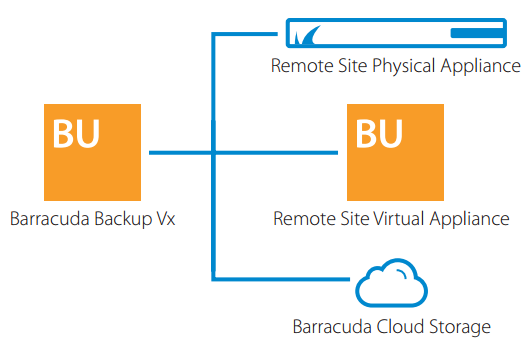
Barracuda Backup Vx has built-in cloud and site-to-site replication.
Benefits:
The Cloud-Integrated All-in-One Backup Solution
Protecting your data in today’s complex infrastructures—combining on-premises, virtual, cloud-hosted, and SaaS environments—presents challenges that competing backup solutions can’t adequately meet. At best, you’ll spend a lot more time and money managing and maintaining multiple solutions. At worst, gaps in coverage leave your data vulnerable.
Barracuda Backup is designed from the ground up for the cloud-integrated systems you depend on today. It gives you the flexibility to easily back up data wherever it resides—on premises or in the cloud—and to replicate the data to our secure cloud or to a private location of your choice. Simple to configure and manage, and totally automated, Barracuda Backup is truly a “set it and forget it” solution for total peace of mind.
- Easy to set up and manage
- Single-vendor solution for on-premise and cloud data
- Multiple deployment options
- Data backup to secure cloud or private location
Key Features: Data Recovery, LiveBoot, Virtual Machine Integration, Replication, Flexible Deployments

Built for the Cloud—Simple and Scalable
The job of managing data across multiple environments is complex, but backup and disaster recovery don't have to be. Deployment, configuration, and ongoing management are fast and easy, thanks to a centralized cloud-based console that gives you complete, single-pane-of-glass visibility into all Barracuda solutions in the global network.
Your shift to the cloud includes moving data into SaaS environments such as Office 365, and your backup strategy must account for that. Barracuda Cloud-to-Cloud Backup protects you against data loss and unintended deletion in Microsoft Office 365.
Key Features: Replication, Unlimited Barracuda Cloud Storage, Centralized Management, Cloud-to-Cloud Backup, Flexible Deployments
Protected by Off-Site and Cloud Replication
Barracuda Backup can automatically replicate your data to a second, off-site physical or virtual appliance, for more complete protection and peace of mind.
Alternatively, use Barracuda Cloud Storage to securely and seamlessly replicate your backed-up data to our geographically distributed, enterprise-grade data centers. Redundant, multi-site storage prevents data loss in case of disaster, and military-grade 256-bit AES encryption ensures data in transit is completely secure.
Key Features: Data Recovery, Inline Deduplication, Replication, Offsite Vaulting, Near Continuous Data Protection
|
|
Features:
Backup
Inline Deduplication
Barracuda inline deduplication, an inherent capability of all Barracuda Backup products, lets organizations significantly reduce storage needs, bandwidth requirements, and backup costs. By deduplicating data as it is received, Barracuda Backup minimizes the time for completion of the full backup and replication process. Barracuda’s advanced variable block deduplication analyzes the data type and chunk size, setting a block size to obtain the greatest level of deduplication. For organizations protecting multiple sites, Barracuda’s global deduplication and cloud storage technology help distributed networks stay protected while reducing the backup storage footprint.
Replication
Barracuda replication technology allows organizations to securely send data to the Barracuda Cloud or another backup appliance. With Barracuda’s replication technologies, organizations can be assured their data is stored with 256-bit AES encryption. Barracuda offers various data centers worldwide to replicate data.
Offsite Vaulting
Organizations with conservative retention policies can use Offsite Vaulting to minimize the cost of backup storage. With Offsite Vaulting, organizations can move local copies of their monthly and yearly backups off their local appliance to the Barracuda Cloud or another Barracuda appliance.
Cloud-to-Cloud Backup
Organizations are migrating to SaaS and Cloud-hosted environments like Office 365. While SaaS and Cloud-hosted environments are fantastic ways to mitigate against natural and mechanical failures, human-caused data loss is always present. Cloud-to-Cloud Backup for Microsoft Office 365 protects Exchange Online mailboxes and OneDrive for Business files and folders from data loss.
Unlimited Barracuda Cloud Storage
Unlimited Barracuda Cloud Storage provides storage to replicate Barracuda Backup to the cloud. Unlimited Barracuda Cloud Storage subscriptions allow replication of data on Barracuda Backup, up to the capacity of your Backup product, to our geographically distributed enterprise-grade datacenters to store your data safely. The included offsite vaulting allows extended retention by moving multiple revisions off Barracuda Backup and into Barracuda Cloud.
Near Continuous Data Protection
The Barracuda Backup Agent can back up mission-critical servers every 15 minutes. These agents only look for new or changed files, minimizing the backup window required.
Recovery
Data Recovery
Barracuda offers a wide range of restore options. Organizations with physical servers are able to perform bare metal restores in case of catastrophic failure. Virtual environments benefit from fast image-based restores. In case of disaster, customers with Instant Replacement can have Barracuda ship an appliance prepopulated with the data in the cloud for fast local restores.
LiveBoot
Barracuda LiveBoot offers organizations protecting their VMware and Microsoft Hyper-V environments with Barracuda Backup the option to leverage Barracuda Cloud Storage if their own virtual environment goes down. Customers can have their local Barracuda Backup act as storage, booting the protected virtual machine from a deduplicated state within minutes. Customers that subscribe to Instant Replacement who replicate to Barracuda Cloud Storage can use Cloud LiveBoot to boot multiple VMs directly from deduplicated storage and assign private or public addresses to the devices.
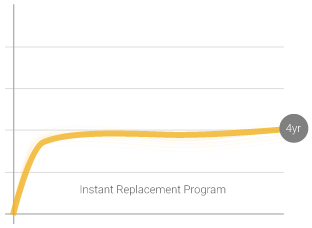
Instant Replacement
In the event of disaster, Barracuda will, upon request, pre-load the most recent data and configuration settings stored in Barracuda Cloud Storage onto the replacement unit. The replacement will be shipped the next business day after the pre-load is completed. Organizations can also leverage Cloud LiveBoot for offsite disaster recovery. As an added benefit, subscribers receive a free hardware refresh to the latest model every four years.
Management
Local Management
Local Control allows complete protection for those operating in private environments or deploying private cloud technologies.
Centralized Management
Barracuda's robust central management allows organizations to manage multiple sites from a clean and simple-to-use interface. Administrators can define roles in their organization for access to each location.
Flexible Deployments
Barracuda Backup is available as both an all-in-one physical appliance or as software that can be deployed in virtual environments to leverage existing compute and storage infrastructures.
Specifications:
| Backup Vx Specification | |
|---|---|
| Management Interface | Barracuda Cloud Control centralized management |
| Barracuda Backup Agent | Windows File System & System State, Microsoft Applications (Exchange, SQL & SharePoint), Linux |
| Network Backups Included | NAS, Unix, Linux, Mac OS X |
| Virtual Environments | Host level: VMware vSphere, Microsoft Hyper-V Guest level: Citrix XenServer, Oracle VM, Red Hat Enterprise Virtualization, KVM |
| Deduplication | Global, Inline, Block-Level, Source- and Target-Based |
| Configurations |
|
| Features | |
| Inline Data Deduplication | |
| Integrated Cloud Replication | |
| Site-to-Site Replication | |
| LiveBoot and Cloud LiveBoot | |
| Granular File and Message Recovery | |
| Unified Cloud Management Interface | |
| No Per-Application or Per-Feature Fees | |
| Cloud-to-Cloud Backup | Optional |
Technical Specs

Backup
- Full local backup and restore
- Inline, block-level, source- and target-based deduplication and compression
- Built-in WAN acceleration
- Cloud or site-to-site replication
- Real-time inline replication to offsite storage
- Export to external disk, tape, autoloaders, or robotic libraries
- 256-bit AES of data in transit and at rest to remote locations
- Near-continuous data protection
- VMware Changed Block Tracking (CBT)
- Single agent for Windows systems and applications

Recovery
- Restore physical server backups into vSphere and Hyper-V virtual environments with Physicalto-Virtual (P2V) restores
- Bare metal restore for Windows and Linux environments
- Download or recover data from anywhere at anytime without the need for a local appliance
- Seamless access to local and offsite data from a single pane of glass
- Rapid VM recovery with LiveBoot and Cloud LiveBoot for VMware and Microsoft Hyper-V environments
- Granular file recovery for VMware and Hyper-V
- File revision history
- Granular Microsoft Exchange message-level recovery
- VMware CBT restores

Offsite Vaulting
- Vault historical revisions offsite to Barracuda Cloud Storage or a remote location
- Extend offsite-only retention up to 12 monthly and 7 yearly revisions

Granular SharePoint Recovery with Kroll Ontrack
- Granular file search and recovery
- Restore to multiple locations

Comprehensive Solution
- Support for VMware and Microsoft Hyper-V enviroments
- Simple per-socket licensing for virtual environments
- Per-server licensing for physical servers
- Built-in replication to Barracuda Cloud Storage or remote site

Administration & Policy Management
- Central management through Barracuda Cloud Control
- Data transfer rate limits
- Health status monitoring via mobile apps
- Role-based administration
- Flexible data retention
- Backup exclusion rules

Reporting & Statistics
- Server health monitoring
- Network traffic utilization
- Storage efficiency
- Replication outage notifications
- Detailed restoration reports
- Audit logs & offline notifications
- Automated email reports
- Large item reports subscriptions
Support Options

Barracuda Energize Updates
- Award-winning live 24/7 customer support
- Firmware updates
- Automatic agent upgrades

Instant Replacement Service
- Replication is built into each Barracuda Backup Vx subscription
- Replicate to Barracuda Cloud Storage or between Barracuda Backup solutions
- Includes a secondary license for replication to a virtual receiver at no additional cost

Cloud Replication
- Pay only for the cloud storage you use
- Plans metered per TB/year include all the storage savings from deduplication and compression
Barracuda Backup FAQ:
The Barracuda Backup is an affordable, integrated local and offsite data backup and disaster recovery solution. The Barracuda Backup combines an onsite appliance with a flexible monthly, quarterly or yearly subscription that replicates data offsite. Combining local and offsite storage provides the best of both worlds – onsite backups for the fastest restore times and secure, offsite storage for disaster recovery.
Equipment storing information can fail. Backup, whether it is local or offsite, maintains a redundant copy of an organization’s valuable data in the event of a system failure or natural disaster as well as retains data to fulfill compliance requirements and litigation requests. With the additional copy of data, IT administrators gain the ability to easily restore important files. A backup solution for data restores is an integral part of an organization’s disaster recovery plan.
Tapes require the manual management of scheduling backups. Hard drives only create one instance of your data. Whether using tapes or hard drives, the stored data has no means to minimize file duplications and does not possess revision history to select the correct historical version to revert back to. Another burden is the need to regularly transport data offsite for a secondary copy in the event of a system failure or disaster.
In comparison, an integrated local and offsite backup solution is easy to manage with automatic backups based on a set time, as well as the secure transfer of data offsite for disaster recovery.
There are several advantages to using an appliance to conduct automated data backups and offsite replication. An appliance created for backup, like the Barracuda Backup Server, is a purpose-built appliance that enables centralized management of backup connections to multiple devices and provides the local storage necessary to keep a primary backup copy onsite for fast recovery in the majority of data loss scenarios.
Software backup solutions need installation and management on every server they protect, plus requires the administration and support of additional hardware to provide recommended local storage of the backup data. Unlike many software solutions, the Barracuda Backup Server protects data using standard networking protocols from computers running a wide range of operating systems. Other benefits of using the appliance for backups include dedicated processing power for deduplication and compression to increase efficiency in storage and transmission, reduction of load on production servers by not having to run backup software and the creation of a dedicated restore device on your local network.
The Barracuda Backup creates a local copy of protected data and efficiently transfers the data offsite without additional burden to production servers. The offsite storage is monitored and managed by Barracuda Central as part of the monthly Barracuda Backup Subscription. With three secure copies of data and several different methods to restore an organization’s assets, the Barracuda Backup is a comprehensive, flexible and efficient solution to achieve your disaster recovery needs.
The Barracuda Backup utilizes an aggressive security combination of symmetrical and asymmetrical encryption to keep your data stored in a format that nobody but you can access. The United States government recently approved 192-bit AES encryption as the preferred method for protecting top secret information. The Barracuda Backup starts with the even more secure 256-bit AES encryption level. Your data is secured by this aggressive encryption methodology both while being transferred offsite and during its storage at Barracuda Central.
The Barracuda Backup is an affordable, integrated local and offsite data backup and disaster recovery solution. The Barracuda Backup combines an onsite appliance with a flexible monthly, quarterly or yearly subscription that replicates data offsite. Combining local and offsite storage provides the best of both worlds – onsite backups for the fastest restore times and secure, offsite storage for disaster recovery.
Data is easy to restore using any of the following methods, including:
- Barracuda Backup Restore Browser
- Barracuda Backup local Restore Browser
- 24/7 Barracuda Technical Support restore assistance
- Shipment of restored data from Barracuda Networks
Yes. Barracuda Backup addresses the security requirements necessary to support compliance with a wide range of industry-specific regulations such as HIPAA for the healthcare industry, and Gramm-Leach-Bliley for financial organizations.
Yes. Retention policies using Barracuda Backup assists organizations in preparing for discovery requests by simplifying the retention and reproduction of electronic data. The flexible data retention options with the Barracuda Backup allow you to enforce specific policies for your various types of data.
For answers to additional questions, please contact us.
Documentation:
Download the Barracuda Backup Vx Datasheet (.PDF)
Pricing Notes:
- Please Note: Energize Updates and Instant Replacement Subscriptions need to be maintained for every Barracuda Product. All subscriptions are continuous and must start from the date of activation. Renewals purchases are continuous and start from the date of expiration of your current subscriptions. No exceptions.
- Benefitis of Energize Updates:
- Basic Support, which includes email support 24x7 and phone support between the hours of 9 a.m. and 5 p.m. Monday through Friday in the US (Pacific Time), Japan, China, Austria and the United Kingdom time zones.
- Firmware Maintenance which includes new firmware updates with feature enhancements and bug fixes.
- Security Updates to patch or repair any security vulnerabilities.
- Optional participation in the Barracuda Early Release Firmware program.
- Benefits of Instant Replacement:
- Enhanced Support which provides phone and email support 24x7.
- Data migration service for Barracuda Spam & Virus Firewalls. Barracuda Networks will assist movement of data and configuration from the old product to the new product if the old data is accessible.
- Data recovery service for Barracuda Backup Servers. In the event of a disaster and upon request, Barracuda Networks will preload the most recent data and configuration stored by Barracuda Networks to the new product (note this may take additional time).
- Hard Disk replacement on Barracuda Networks models that have swappable raid drives. Barracuda Networks will ship via standard shipping a hard disk replacement. Customer must return the failed hard disk to Barracuda Networks.
List Price:
Our Price: $980.40
List Price:
Our Price: $1,482.00