

Overview:
80 percent of organizations report taking over 6 hours to respond to email attacks.
During that time, threats are free to spread throughout the network, causing mounting damage and increasing costs.
Slash the time between detection and remediation.
Respond to attacks and stop the damage in minutes, with powerful delivered-email search and rapid deletion from all inboxes.
Proactively identify security threats with threat insights.
Identify anomalies that may indicate threats, based on insights gathered from analysis of previously delivered email and community-sourced intelligence.
Prevent future attacks.
Use intelligence gathered from previously remediated threats to continuously block future emails from malicious actors, and to identify your most vulnerable users.
Reduce the impact and cost of email attacks.
When email-borne attacks evade security and land in your users’ inboxes, you need to respond quickly and accurately to prevent damage and to limit the spread of the attack. Responding to attacks manually is time-consuming and inefficient, which allows threats to spread and damages to increase.
Barracuda Incident Response automates these processes to ensure that you quickly identify the nature and scope of the attack, immediately eliminate malicious emails, and carry out remediation actions rapidly to halt the attack’s progress and minimize damages.
Respond faster and more effectively with:
- Post-delivery threat removal
- Notification of affected users
- Fast click-through remediation
- Security incident alerts
- Automated response playbooks
Respond immediately to email-borne attacks.
When malicious email is reported to IT, Barracuda Incident Response lets you immediately search all delivered email, by sender or subject, to identify all internal users who have received it. You can then automatically remove all instances of the threat-bearing email. Automatic remediation will identify and remove email messages that contain malicious URLs or attachments post-delivery directly from user’s mailboxes without your involvement.

Automate your entire incident response process.
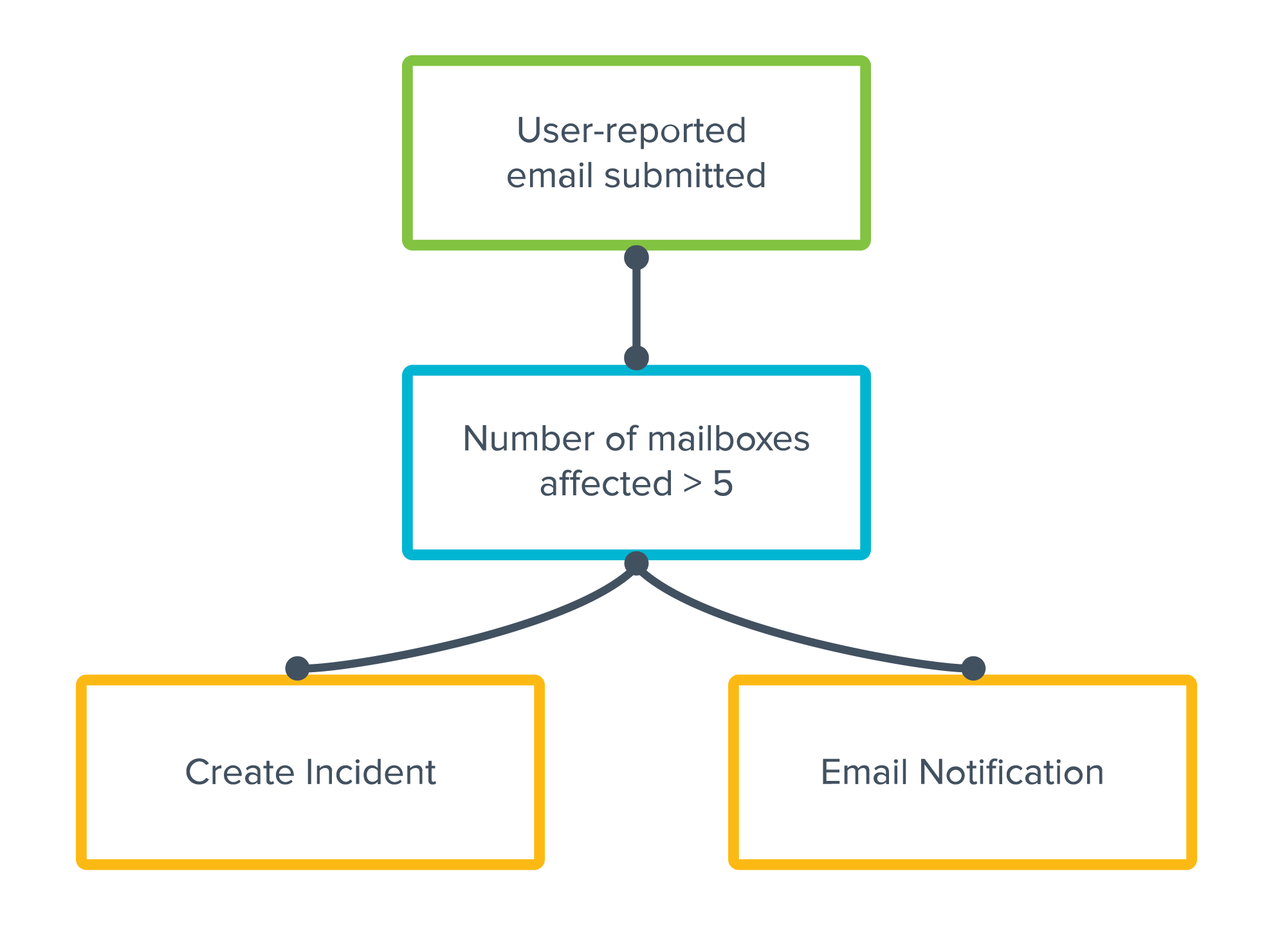
Incident response playbooks help outline effective response workflows but often include manual, repetitive tasks that can be time-consuming to complete. Our Automated Workflow functionality empowers you to build custom playbooks and completely automate your response to a variety of email events, across a range of solutions. Additionally, our public APIs allow you to integrate response data with your SIEM/SOAR/XDR platforms to streamline operations and further preserve IT resources.
Limit damage.
In addition to identifying who received the malicious email, Incident Response lets you identify the users who actually clicked on a malicious link. It can then automatically deliver instructions to update passwords or take other actions to limit the spread of the attack. These users can also be assigned enhanced security awareness training to prevent future incidents.

Gain insights to prevent future attacks.
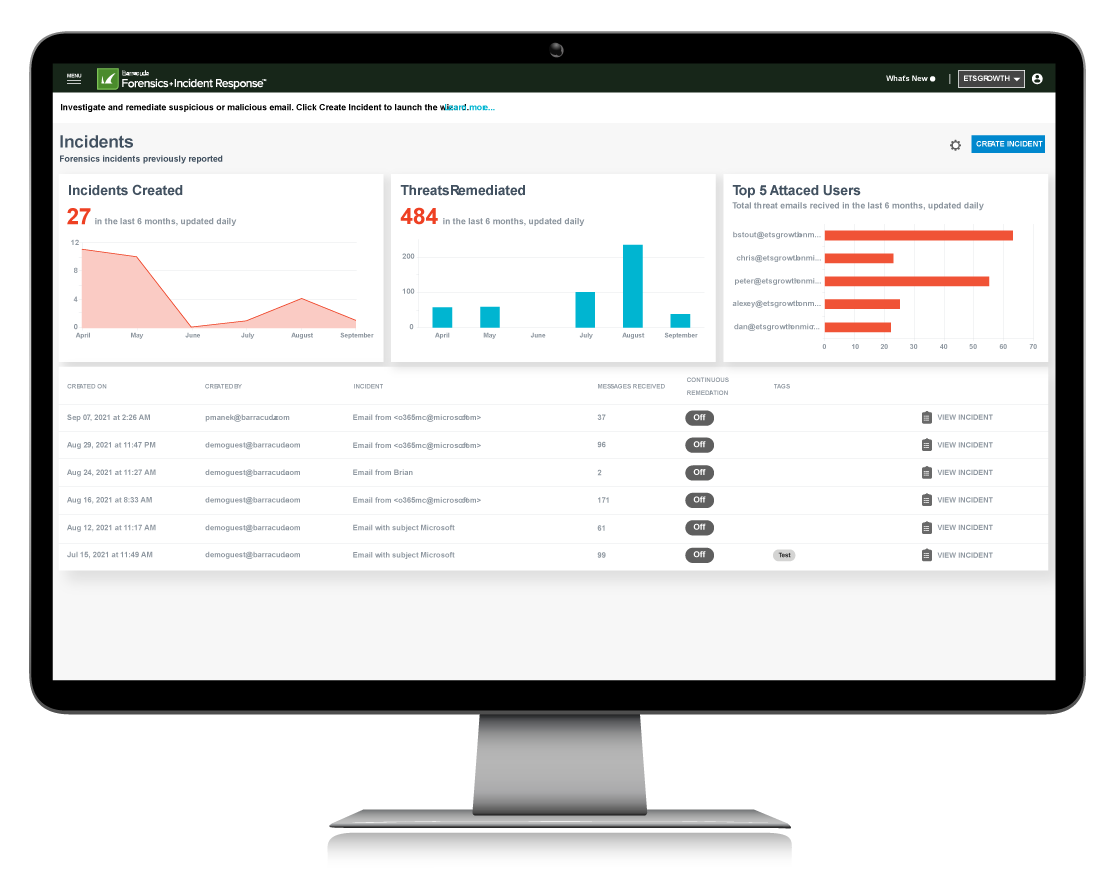
Incident Response has powerful analytic capabilities that allow you to use insights gathered from analysis of delivered email to identify anomalies in email that’s already in your users’ inboxes. For example, you can review geographies where inbound email is coming from, and proactively identify malicious email from countries you don’t usually do business with. You can prioritize and uncover new threats using data on potential incidents related to ones already created by you or other Barracuda customers, and on threats that are currently circulating and have been identified by Barracuda intelligence. This insight will help your team to identify threats that otherwise go unnoticed.
Integrated domain-based phishing protection.
Barracuda Incident Response also has content-security capabilities to offer protection across email and web. It detects and automatically blocks malicious domains contained in phishing emails for all users using API integration. DNS phishing protection works seamlessly to provide a unified threat management response against advanced attacks. This feature is available to customers of Incident Response and Barracuda Content Shield.


Features:
Threat Hunting
Users can report phishing and other suspicious emails to their IT administrators directly from the Outlook Essentials Message Actions add-in. This provides end users with a simpler way to report suspicious emails to their IT department. Reported messages will appear in the Incident Response dashboard for IT to review, investigate, and take corrective action.
Incident Response can help you locate potential threats looming in your Office 365 account. Potential incidents comprise two categories:
- Related threats — Threats based on an incident you already created.
- Post-delivery threats — Based on Barracuda’s (community) intelligence on currently circulating threats that might already be present in your inbox.
Incident Response gives you access to Insights to glean more information about email-use patterns. This intelligence can be used to identify anomalies in delivered mail and to uncover instances of phishing attacks that might otherwise go undetected.
Remediation
Identity all users who received malicious emails and clicked on links, replied to, or forwarded these messages. Automatically send them email notifications with instructions to change their passwords and other necessary remediation actions.
Use Incident Response to identify users that received malicious email and permanently remove malicious emails directly from user inboxes. This action can be taken by an IT administrator without the need to involve end users.
Use Incident Response to identify users that received malicious email and automatically send alerts notifying them of an incident. These emails can be sent in bulk to all affected users.
Automation
You can enable Incident Response to automatically remediate email messages that contain malicious URLs or attachments. All user-reported messages are automatically scanned for malicious content. When a threat is detected, all matching emails are moved from users’ mailboxes into their junk folders. Security teams will get an alert notifying them of an incident.
Email attacks come in waves. When you activate Continuous Remediation, Incident Response will continue to delete any copies of the email that appear in inboxes for 72 hours after the initial remediation has completed.
Build custom playbooks to completely automate your incident response process. Admins at any technical level can create a workflow and add complexity by defining a trigger, determining conditions, and assigning the desired actions through a simple user interface.
Incident Response RESTful API (beta) provides remote administration and configuration of Barracuda Incident Response.
Syslog Integration enables you to export your event data to a syslog server or a security information and events management (SIEM) system. With Syslog Integration, you can store your information and use it for tracking, analysis, and troubleshooting.
Plans:
Barracuda offers 3 ways to protect your email, data, users, and acess
Comprehensive Microsoft 365 Protection Starts Here.
Incident Response is included in Barracuda Email Protection.

Protect users from all email threat types with secure email gateway combined with artificial intelligence.

Includes everything from Advanced.
Add automated post-delivery email incident response to your email security to save resources and secure your users mailboxes.

Includes everything from Premium.
Get comprehensive protection for Microsoft 365 by improving your resiliency with user training, data protection, email archiving, and zero trust access.
| Capabilities | Advanced | Premium | Premium Plus |
|---|---|---|---|
| PREVENT THREATS | |||
| Spam and Malware Protection Identify and block spam, viruses, and malware delivered via email messages. Using virus scanning, spam scoring, real-time intent analysis, URL link protection, reputation checks, and other techniques, Barracuda scans email messages and files. |
|||
| Attachment Protection Barracuda combines behavioral, heuristic, and sandboxing technologies to protect against zero-hour and targeted attacks. A sandbox environment is used to detonate and observe behavior of suspicious attachments. |
|||
| Link Protection Link Protection automatically rewrites URLs so that Barracuda can sandbox the request at click time to block malicious links. |
|||
| Email Continuity In the event of a mail server outage or loss of connectivity, an emergency mailbox lets users continue to send and receive emails, staying productive until your primary servers are back online. |
|||
| Phishing and Impersonation Protection Automatically detect and prevent impersonation, business email compromise, and other targeted attacks. Barracuda’s AI engine learns each organization's unique communication patterns and leverages these patterns to identify anomalies and prevent socially engineered attacks in real time. |
|||
| Account Takeover Protection Stop phishing attacks used to harvest credentials for account takeover. AI detects anomalous email behavior and alerts IT, then finds and removes all fraud emails sent from compromised accounts. |
|||
| Domain Fraud Protection Prevent email domain fraud with DMARC reporting and analysis. Barracuda provides granular visibility and analysis of DMARC reports and helps you minimize false positives, protect legitimate email, and prevent spoofing. |
|||
| Web Security Protect users from accessing malicious web content with advanced DNS and URL filtering. |
|||
| Zero Trust Access for Microsoft 365 Mitigate breach risks for remote employees and contractors and reduce your exposure to lateral attacks on Microsoft 365 applications by deploying continuous verification of user and device identity and trust. |
|||
| DETECT AND RESPOND | |||
| Automatic Remediation All user-reported messages are automatically scanned for malicious URLs or attachments. When a threat is detected, all matching emails are automatically moved from users' mailboxes into their junk folders. |
|||
| SIEM/SOAR/XDR Integration Orchestrate incident response cross-product with RESTful API (beta) and syslog integrations. Remotely administer and configure incident response capabilities and store your event data for tracking, analysis, and troubleshooting. |
|||
| Threat Hunting and Response Quickly identify and efficiently remediate post-delivery threats by automating investigative workflows and enabling direct removal of malicious emails. |
|||
| Automated Workflows Build custom playbooks to completely automate your incident response process. Admins at any technical level can create a workflow by defining a trigger, determining conditions, and assigning the desired actions through a simple user interface. |
|||
| Attack Simulation Simulated phishing attacks are constantly updated to reflect the most recent and most common threats. Simulations are not limited to email, but also include voice, SMS, and portable-media (USB stick) attacks. |
|||
| Security Awareness Training Get access to advanced, automated education technology that includes simulation-based training, continuous testing, powerful reporting for administrators, and active incident-response awareness. |
|||
| SECURE DATA, ENSURE COMPLIANCE | |||
| Email Encryption Secures your mail by encrypting it during transport to the Barracuda Message Center, encrypting it at rest for storage in the cloud, and providing secure retrieval by your recipients through HTTPS web access. Create a policy to automatically encrypt emails based on their sender, content, and other criteria. |
|||
| Data Loss Prevention Create and enforce content policies to prevent sensitive data, including credit card numbers, Social Security numbers, HIPAA data, customer lists, and other private information, from being sent by email. Policies can automatically encrypt, quarantine, or block certain outbound emails based on their content, sender, or recipient. |
|||
| Cloud Archiving A cloud-based, indexed archive allows for granular retention policies, extensive search, role-based auditing/permissions, legal hold, and export. Easily comply with e-discovery requests and regulatory or policy-retention requirements. |
|||
| Cloud-to-Cloud Backup Get data protection and cloud backup for Office 365 data, including Exchange Online mailboxes, SharePoint Online, OneDrive for Business, and Teams. Fast point-in-time recovery in the event of accidental or malicious deletion. |
|||
| Data Inspector Automatically scan your OneDrive for Business and SharePoint data for sensitive information and malicious files containing malware. Use it to develop policies that comply with GDPR, CCPA, and other data privacy regulations. |
|||
Documentation:
Download the Barracuda Incident Response Datasheet (PDF).
Download the Barracuda Email Protection (PDF).
Pricing Notes:
- Pricing and product availability subject to change without notice.