Barracuda Backup 3004
Cloud-Connected Backup Appliance


Overview:
Barracuda Backup offers businesses a flexible, reliable, and cost-effective solution to backup and restore data. Barracuda Backup can be deployed as a physical or virtual appliance on-premises, which acts as a backup target for data from a variety of different sources such as servers, virtual machines, databases, and applications.
Secure, reliable ransomware protection with fast recovery.
Don't let criminals hold your data hostage. With Barracuda, recovering your data is as simple as eliminating the malware, deleting the attacker-encrypted files, and restoring a good copy of your valuable data.
Cost-effective data protection that is easy to use.
Simple to configure and manage, Barracuda Backup is a secure, all-in-one solution that offers total peace of mind. The capacity-based, all-inclusive subscription model allows you to pay for only what you need to protect today, avoiding large upfront hardware costs — and everything you need is included.
Flexibility of on-premises or cloud replication for protecting physical, virtual, and hybrid environments.
With cloud-based subscriptions, Barracuda Backup can securely back up and recover data including files located on virtual and physical environments.
Secure, reliable ransomware protection.
Most cybersecurity experts agree that the number one priority in ransomware protection is the ability to recover from ransomware with a good backup. But you also need to make sure that your backup is secure. Barracuda Backup’s ransomware protection features include:
- Immutable backups
- Multifactor authentication
- End-to-end encryption
- Role-based access controls
- No network sharing protocols
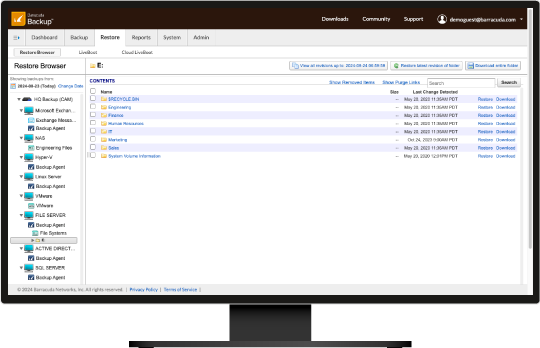
The user interface makes finding and restoring your data easy.
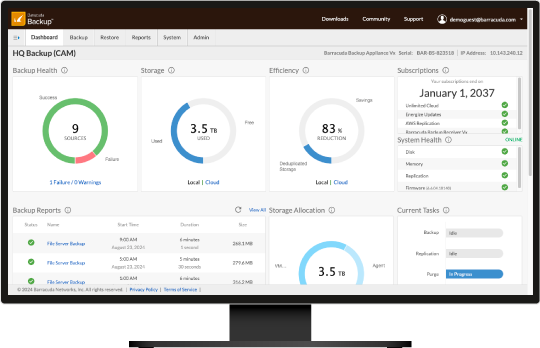
The dashboard provides information at a glance.
Cost-effective data protection that is easy to use.
Barracuda offers flexible backup including physical and virtual options that include everything you need with no hidden fees. Each Barracuda Backup subscription includes the appliance with local storage, software and support, optional Barracuda cloud storage, 4-year hardware refresh, and Barracuda’s Instant Replacement service.
Choose the deployment that works best for your environment:
- Barracuda Backup Appliance. Purpose-built, all-inclusive physical appliance for on-site data protection.
- Barracuda Backup Virtual Appliance. Get all the advantages of Barracuda Backup on your own hardware.
Deployment, configuration, and ongoing management are all controlled via a centralized cloud-based console. You can manage the health of all backed up servers, network traffic utilization, and detailed reports for your global network all from a single pane of glass.
Flexible on-premises or cloud replication.
User error, malicious deletion, natural disasters, and cyberattacks can all threaten your data and therefore your business. Barracuda can securely back up and recover data including files located on physical and virtual environments, such as:
- VMware vSphere and Microsoft Hyper-V
- Microsoft Windows, Linux, MacOS, Microsoft Windows, SQL data, and Microsoft Exchange
- Network-attached storage
Backed up data can be replicated to the off-site location of your choice, including to secure Barracuda Cloud Storage or another physical location.
Barracuda Backup simplifies the data recovery process, ensuring that businesses can quickly bounce back from any data loss incident. With its versatile recovery options, users can restore individual files, entire directories, or even complete systems with just a few clicks. The solution supports granular recovery capabilities, which are essential for minimizing downtime and disruption in today’s fast-paced business environments.
Whether you need to recover data from physical servers, virtual machines, or Microsoft-based applications, Barracuda Backup provides a streamlined and efficient approach to data restoration, making it easier than ever to maintain business continuity and operational resilience.
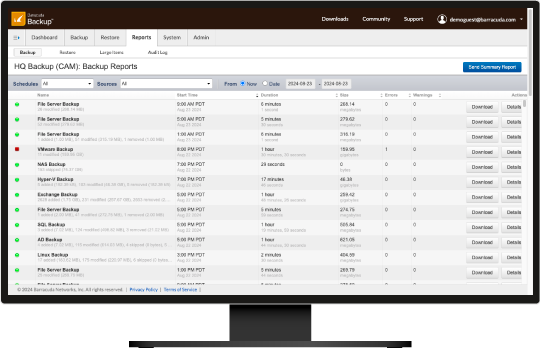
Protect all your critical data.

Barracuda: Your trusted partner in cybersecurity.
Effective data protection requires more than just a good backup system, and Barracuda is more than just a data backup company. For even more protection, consider Barracuda Email Protection, the industry’s most complete email security platform. We also offer a full line of email security, archiving, firewall, and content security products.
Choose the deployment that works best for your environment:
- Barracuda Cloud-to-Cloud Backup. Protect your Microsoft 365 environment including emails, attachments, calendars, contacts, and tasks, as well as Teams, SharePoint Online, OneDrive, OneNote, and Entra ID.
All products are supported by our award-winning 24x7 technical support staffed by in-house engineers with no phone trees.
Features:
Deployment and management
Barracuda Backup is available as an all-in-one purpose-built backup appliance or as a virtual appliance that can run in VMware vSphere and Microsoft Hyper-V environments.
Backup storage capacity is scalable via simple backup-as-a-service subscription licensing. Protect your most critical data today and scale up your backup storage as your environment grows.
Barracuda’s robust centralized management allows organizations to manage backups from multiple sites from a clean and simple-to-use interface. Administrators can define roles in their organization for access to each location.
Barracuda Backup supports several languages, including English, Japanese, French, Italian, German, and Spanish.
Workload support
Barracuda Backup supports the backup and recovery of VMware vSphere and Microsoft Hyper-V virtual machines.
Barracuda Backup supports the backup and recovery of physical servers, workstations, and endpoints running Microsoft Windows, Linux, and MacOS.
Barracuda Backup supports the backup and recovery of file shares on network-attached storage (NAS).
Barracuda Backup supports application-aware backup and recovery of Microsoft SQL and Microsoft Exchange applications.
Ransomware protection
Barracuda Backup maintains immutable backup copies by preventing direct access to the data. It also offers protections against data modification or removal via API. This means that you can only access and remove data through the secure Barracuda Backup interface, which can be additionally secured using multifactor authentication (MFA). In addition, data stored in the Barracuda Cloud is written once and never updated, providing an additional layer of protection.
Barracuda Backup runs on a hardened Linux platform, which makes it less susceptible to malware and ransomware attacks than Windows-based backup solutions. The platform also prevents any unauthorized services from running, blocking the execution and spread of ransomware throughout the backup data.
Multifactor authentication provides an additional layer of security to the accounts and credentials used to access Barracuda Backup. With MFA, the attackers not only need the login and password, but they also need a secondary device and application to confirm the identity of the backup administrator.
Data stored in the Barracuda Cloud is encrypted and can only be accessed, modified, or deleted through the secure Barracuda Backup interface. There is also a delay in the purging of data in the cloud so that data can still be recovered if it is accidentally or maliciously deleted from the local appliance. This creates an air gap between the appliance and the cloud, further protecting data against ransomware.
An integrated backup appliance reduces the risk of the backup storage being attacked, by eliminating any network sharing protocols. Having an integrated solution that includes the backup software, storage, and offsite storage also reduces the number of attack surfaces, making it easier to secure the entire solution.
Following the principle of least privilege, users accessing the backup system should only be given privileges that are essential to their specific role. With Barracuda Backup, you can assign various user roles, including account administrators, restricted users, and view-only permission. This minimizes the chances of an attacker accessing the backup system with the most powerful administrative privileges.
It’s common for backups to be stored on network-attached storage (NAS) devices using a network sharing protocol, such as Network File System (NFS) or Common Internet File System (CIFS). These file shares can be easily discovered and accessed by an attacker, putting backup data at risk. Barracuda Backup does not expose any network file sharing protocols, preventing access to the backup storage.
Barracuda Backup provides AES 256-bit encryption of data at-rest on the appliance, in-transit whenever it’s sent off-site, and stored at-rest on the replication destination. All communication with the appliance is also done over an encrypted VPN tunnel. Encryption renders the backup data unreadable if an attacker has gained access to it.
IP login restrictions can be set for each user with access to Barracuda Backup. Those restrictions prevent access to the web interface from any IP address outside the specified range.
Backup and recovery
Full local backup and recovery of physical and virtual environments. Backup agents support the backup and recovery of Microsoft Windows, Linux, and MacOS systems. Virtual host-level backups for VMware vSphere and Microsoft Hyper-V. Application-aware backups for Microsoft SQL and Exchange.
Customizable backup schedules and retention policies, as well as automated or manual backups. Ability to granularly select data in each backup schedule. Backups can be scheduled as often as every 15 minutes, providing near-continuous backup.
Barracuda’s incremental-forever backups shorten backup windows and reduce storage needs, bandwidth requirements, and backup costs.
Barracuda in-line deduplication, an inherent capability of all Barracuda Backup products, lets organizations significantly reduce storage needs, bandwidth requirements, and backup costs. By deduplicating data as it is received, Barracuda Backup minimizes the time for completion of the full backup and replication process. Barracuda’s advanced variable block deduplication analyzes the data type and chunk size, setting a block size to obtain the greatest level of deduplication. For organizations protecting multiple sites, Barracuda’s global deduplication and cloud storage technology help distributed networks stay protected while reducing the backup storage footprint.
Organizations with conservative retention policies can use the Offsite Vaulting feature to minimize the cost of backup storage. With Offsite Vaulting, organizations can move local copies of their monthly and yearly backups off their local appliance to the Barracuda Cloud or another Barracuda appliance.
Barracuda offers a wide range of fast recovery options. Image-based virtual machine restores and instant recovery for VMware virtual machines get entire systems back up and running quickly. Organizations with physical servers can perform bare metal or physical-to-virtual (P2V) restores in case of catastrophic failure. Granular file and folder recovery is supported for both physical and virtual systems. All recovery options contain full revision history and file permissions.
Off-site replication
Integrated Barracuda Cloud Storage provides a simple option for storing copies of backup data off-site securely. Barracuda Cloud Storage is available in six regions globally: US, Canada, UK, Germany, Japan, and Australia.
Backup data can be replicated off-site to other physical or virtual Barracuda Backup appliances, providing a local and secure option for organizations wanting more control over their data.
All data replicated off-site from Barracuda Backup is secured using 256-bit AES encryption in-transit and at-rest and includes built-in WAN acceleration and the ability to rate limit bandwidth consumption.
Monitoring and reporting
An overview dashboard provides easy centralized management and visibility over all backups and locations.
Automated monitoring and alerting are provided for all backup activity, as well as system and hardware health. Whatever the issue, Barracuda Backup keeps you informed.
Detailed backup and restore reports keep you informed on the status and history of those jobs, while daily email summary reports provide you with a quick glance of all backup activity.
Support and subscriptions
Barracuda’s Cloud Storage subscription provides worry-free off-site storage with no overage fees and no need to guess how much storage to buy.
Barracuda’s Energize Updates subscription provides ongoing protection from cyberthreats, as well as ongoing product updates.
Barracuda’s Instant Replacement subscription provides priority hardware replacement in case of failure and a hardware refresh after four years, keeping you on the latest hardware platform and extending the life of your backup solution.
Model Comparison:
Scalable appliances
Purpose-built, all-inclusive backup appliances that easily scale to support growing backup storage without complex hardware upgrades
| MODEL | 3004 | 3024 | 3080 | 3299 |
|---|---|---|---|---|
| CAPACITY | ||||
| Maximum usable storage capacity | 4 TB | 24 TB | 80 TB | 200 TB |
| Support environment size (range) | 1-2 TB | 3-12 TB | 13-40 TB | 41-100 TB |
| HARDWARE SPECIFICATIONS | ||||
| Disk arrangement | 2 x 2 TB SSD | 4 x 12 TB HDD | 9 x 18 TB HDD | 20 x 18 TB HDD |
| Storage array | – | SW RAID 10 | SW RAID 60 | SW RAID 60 |
| Dedicated database & OS disks | – | 1 TB SSD | 2 TB SSD | 2 TB SSD |
| Network connections | 2 x 1 Gb RJ45 | 2 x 10Gb RJ45 | 2 x 10Gb RJ45 | 2 x 10Gb RJ45 |
| 10Gb fiber interface SFP+ transceiver module (LC multimode) | – | – | 2-port SFP+ | 2-port SFP+ |
| Power supply | 60W external | 550W | 1300W redundant | 1300W redundant |
| Input voltage | 100-240V | 100-240V | 100-240V | 100-240V |
| Encryption (at-rest) | TPM 2.0 | TPM 2.0 | TPM 2.0 | TPM 2.0 |
| Form factor | Desktop | 1U | 2U | 4U |
| Dimensions (inches: W x H x D) | 11.8 x 1.73 x 8.6 | 17.24 x 1.73 x 25.8 | 17.2 x 3.46 x 25.75 | 17.24 x 6.86 x 25.24 |
| Weight (lbs.) | 3.4 | 27.6 | 52.9 | 74.4 |
| Site-to-site offsite replication | Send | Send/Receive | Send/Receive | Send/Receive |
Virtual
Barracuda Backup - software only version
| Software solutions that can be deployed in virtual environments | |
| Leverage existing computer and storage infrastructures | |
| Optimizes local storage and bandwidth requirements | |
| Built-in inline deduplication and compression | |
| Includes software replication | |
| Licensed as a per-socket subscription for virtual hosts | |
| Licensed as a per-server subscription for physical servers | |
| Inline data deduplication | |
| Integrated cloud replication | |
| Site-to-site replication | |
| LiveBoot and Cloud LiveBoot | |
| Granular file and message recovery | |
| Unified cloud management interface | |
| No per-application or per-feature fees |
Gallery:
Backup does not have to be difficult and expensive. The award-winning Barracuda Backup was designed to simplify the backup and recovery of data in hybrid, multi-location environments.
Check out the gallery below to explore this product and see what customers and industry analysts are saying about Barracuda.
Protect Your Critical Data from a Single Pane of Glass
Barracuda Backup provides a simple web-based management tool for protecting your business data regardless of location and source.
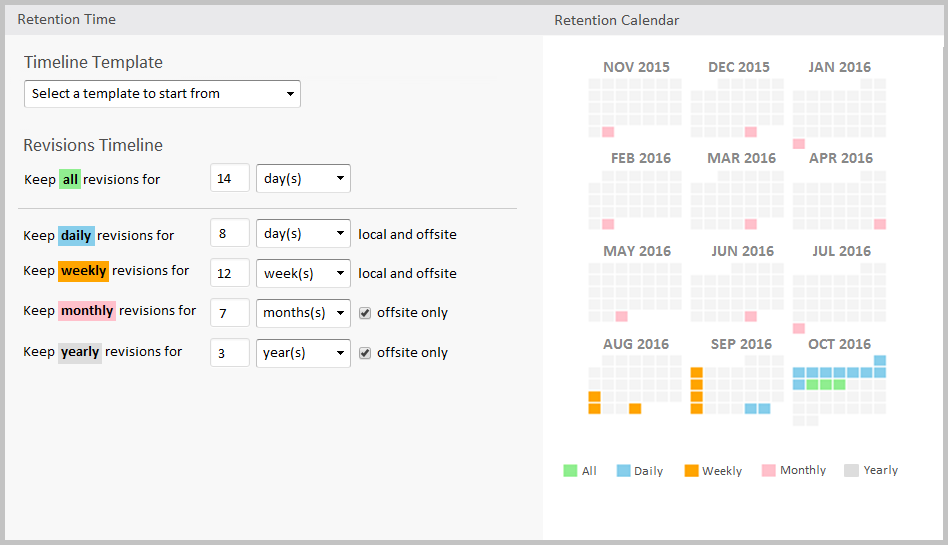
Easily Manage Granular Retention Policies
You can define the period of time to retain backups on your local storage, offsite storage or both for a perfect balance of data protection versus storage requirements.
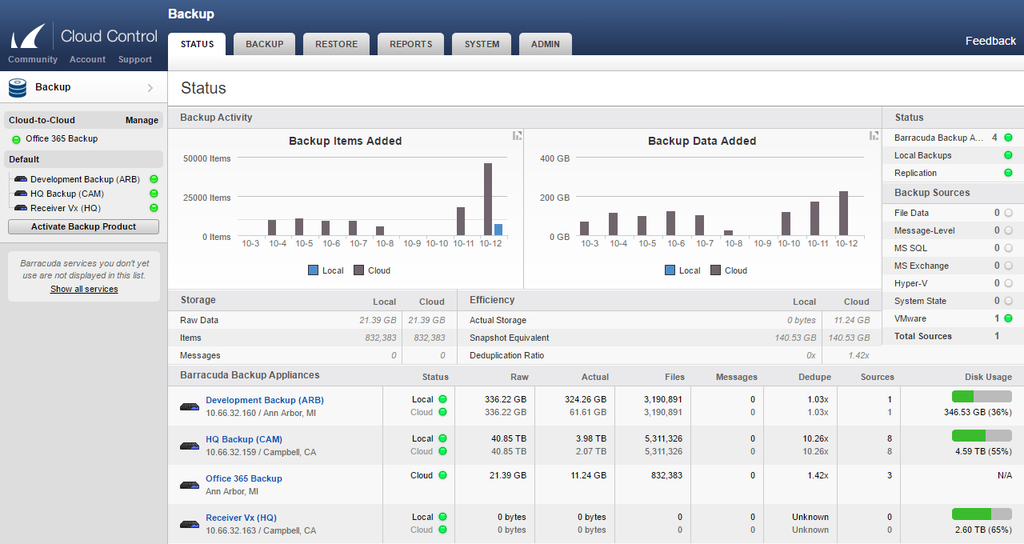
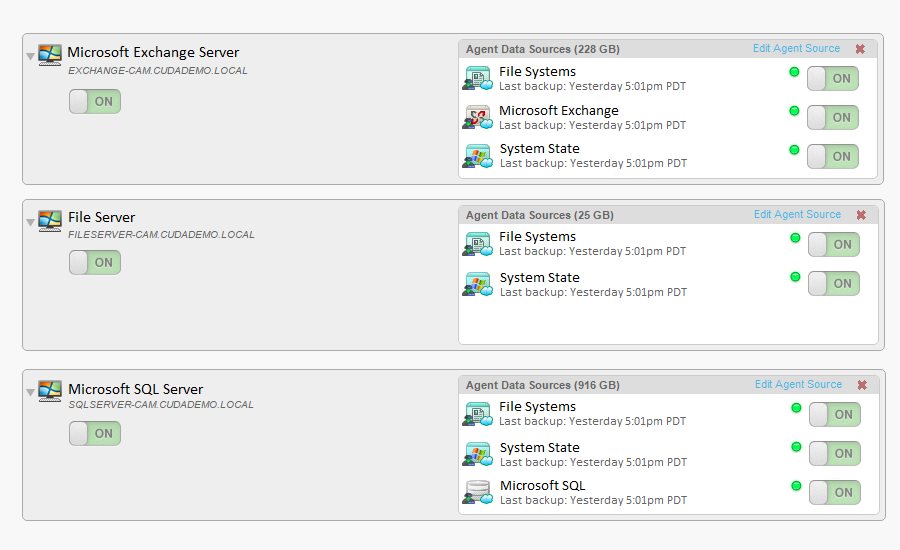
Monitor Backup Statuses by Data Source
Protect all of your environments including file servers, virtual servers (VM and Hyper-V), SQL databases, Microsoft Exchange and even Office 365.
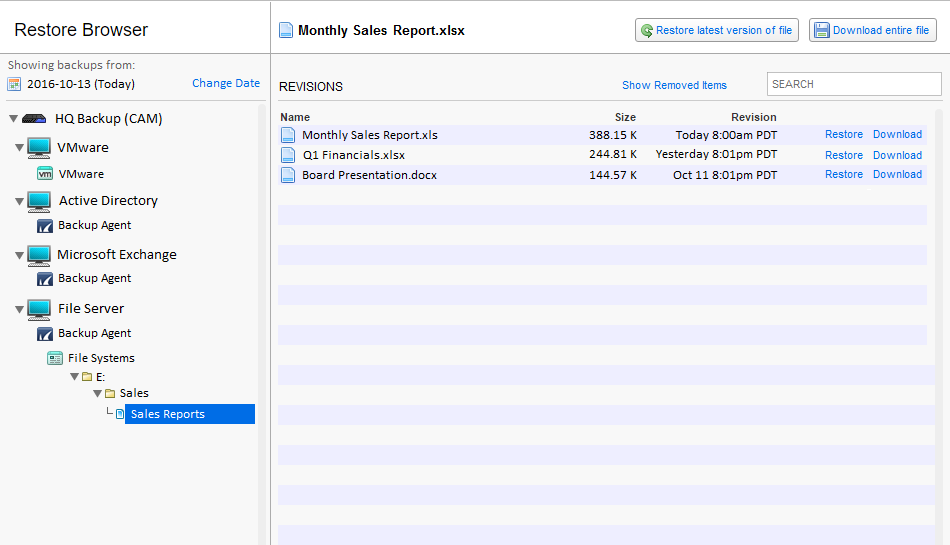
Simple Explorer Interface to Restore Any File
Restore or download any backed up files using a simple interface that works like your local file system.
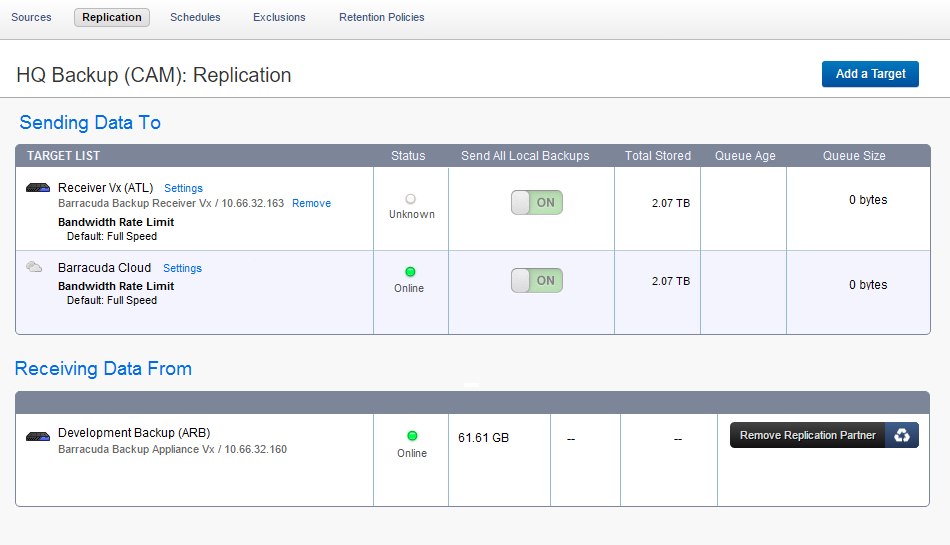
Automatically Replicate Data to Any Location
Backed up data can be replicated to other sites or the secure Barracuda Cloud to prevent a single point of failure in your data protection.
Stay Current with Energize Updates
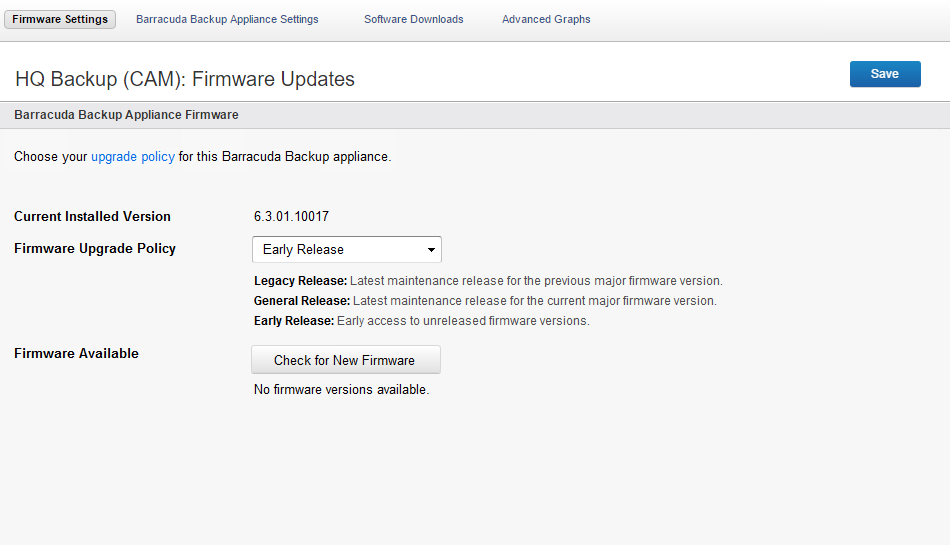
Barracuda’s Energize Updates ensure that your Barracuda Backup appliance is automatically kept up to date with the latest new versions and security fixes.
Barracuda Backup FAQ:
Barracuda Backup is a comprehensive data protection solution that offers efficient and reliable backup and recovery for on-premises virtual and physical environments. Barracuda Backup is designed to safeguard critical data by creating reliable backups. It provides rapid recovery options in the event of ransomware, data loss, system failures, or other unforeseen circumstances.
Barracuda Backup combines both on-premises and cloud-based technologies to create a robust backup infrastructure. Barracuda Backup can be deployed as a physical or virtual appliance on-premises, which acts as a backup target for data from various sources such as servers, virtual machines, databases, and applications.
Barracuda Backup protects your data by backing it up from your physical and virtual environments, storing it on a physical or virtual backup appliance, and replicating a copy securely to Barracuda’s cloud storage or to another Barracuda Backup appliance at the location of your choice. It uses advanced deduplication and compression technologies to optimize storage usage and bandwidth.
Barracuda Backup can protect data from a wide range of platforms including Windows, Linux, MacOS, VMware, Hyper-V, and network-attached storage (NAS).
Barracuda Backup can support off-site replication to Barracuda Cloud Storage or to another Barracuda Backup physical or virtual appliance.
Barracuda recommends that you follow the 3-2-1 rule to create a successful data protection and disaster recovery plan:
- You must have at least 3 copies of your data — the original production data and 2 backup copies.
- You must use at least 2 different types of media to store the copies of your data, for example, the local Barracuda Backup appliance and Barracuda Cloud Storage.
- You must keep at least 1 backup offsite, for example, in the Barracuda Cloud or on another physical or virtual Barracuda Backup appliance at a different location.
Barracuda Backup is designed to scale with your business and data protection needs. There are four hardware models and a virtual appliance available, each supporting a range of environments and backup storage needs. Barracuda Backup is purchased using a per-terabyte-protected subscription license. Each per-terabyte license is based on the amount of front-end raw data that needs to be protected in your environment.
This model lets you license based on the data that you need to protect today, while giving you the flexibility to simply purchase additional licenses and automatically scale up your storage to meet future requirements, all without the need to ship additional hardware or replace your appliance.
Barracuda Backup is an all-in-one solution designed to provide everything you need to fully protect your on-premises data. Each Barracuda Backup subscription includes the appliance hardware, software and support, Barracuda Cloud Storage, and Barracuda’s Instant Replacement service. Organizations that do not wish to store data off-site using Barracuda Cloud Storage can replicate data between Barracuda Backup physical and virtual appliances by purchasing a subscription without Barracuda Cloud Storage.
Each front-end per-terabyte license includes twice the amount of back-end usable storage capacity. For example, if you purchase a quantity of 5 licenses to protect a 5 terabyte on-premises environment, you will receive 10 terabytes of usable storage capacity on the Barracuda Backup appliance. To increase the back-end usable storage capacity, you can buy additional licenses, which will automatically increase the back-end usable storage capacity.
Yes, Barracuda Backup can protect data in remote offices or branch locations. It can be deployed as a physical appliance or as a virtual appliance to suit various environments and requirements.
Data backed up with Barracuda Backup is encrypted both in-transit and at-rest using industry-standard encryption protocols (256-bit AES). Additionally, Barracuda Cloud Storage is highly secure and compliant with various regulatory standards.
Data restoration with Barracuda Backup is straightforward and flexible. You can restore entire systems, specific files, or data from a specific point in time using Barracuda’s web-based management interface. Restores can be performed to the original location or to alternate locations.
The retention policy can be customized based on your organization’s needs. Barracuda Backup offers granular retention policies that allow you to retain data for specific periods and ensure compliance with legal and regulatory requirements.
Barracuda Backup provides a centralized management dashboard that allows you to monitor the status of your backups, view alerts, and generate reports on backup health, storage usage, and more.
Barracuda offers 24/7 customer support through phone, email, and live chat. Additionally, there are extensive online resources such as documentation, how-to guides, and community forums available.
All Barracuda Backup subscriptions include Enhanced Support. Premium Support and Professional Services are available as additional services.
To get started with Barracuda Backup, you can contact a Barracuda sales representative or visit the Barracuda website to request a demo or quote.
Installation and setup are straightforward, and Barracuda’s support team can assist you throughout the process.
Documentation:
Download the Barracuda Backup Datasheet (.PDF)
Download the Barracuda Cloud-to-Cloud Backup Datasheet (.PDF)
Pricing Notes:
- Please Note: Energize Updates and Instant Replacement Subscriptions need to be maintained for every Barracuda Product. All subscriptions are continuous and must start from the date of activation. Renewals purchases are continuous and start from the date of expiration of your current subscriptions. No exceptions.
- Benefitis of Energize Updates:
- Basic Support, which includes email support 24x7 and phone support between the hours of 9 a.m. and 5 p.m. Monday through Friday in the US (Pacific Time), Japan, China, Austria and the United Kingdom time zones.
- Firmware Maintenance which includes new firmware updates with feature enhancements and bug fixes.
- Security Updates to patch or repair any security vulnerabilities.
- Optional participation in the Barracuda Early Release Firmware program.
- Benefits of Instant Replacement:
- Enhanced Support which provides phone and email support 24x7.
- Data migration service for Barracuda Spam & Virus Firewalls. Barracuda Networks will assist movement of data and configuration from the old product to the new product if the old data is accessible.
- Data recovery service for Barracuda Backup Servers. In the event of a disaster and upon request, Barracuda Networks will preload the most recent data and configuration stored by Barracuda Networks to the new product (note this may take additional time).
- Hard Disk replacement on Barracuda Networks models that have swappable raid drives. Barracuda Networks will ship via standard shipping a hard disk replacement. Customer must return the failed hard disk to Barracuda Networks.