Barracuda Message Archiver for Microsoft Azure
Protect Your Email Infrastructure with Microsoft Azures

Sorry, this product is no longer available, please contact us for a replacement.
Overview:
 Moving your IT Infrastructure to the Cloud? Utilizing Microsoft Office 365? Running on Microsoft Azure?
Barracuda Networks is your partner for various kinds of deployments in Microsoft Azure. We understand your IT needs and we’re acknowledged as “Microsoft Partner – Gold Application Development.” We are also “Microsoft Azure Certified.”
Barracuda Networks and Microsoft Azure
Barracuda Networks was the first Microsoft Azure Certified Security Solution Provider. The Microsoft Azure Certification assures that the Barracuda Solutions have been tested for readiness and compatibility with Microsoft Azure public cloud, Microsoft Cloud Platform hosted by service providers through the Cloud OS Network, and on-premises private cloud Windows Server Hyper-V deployments.
The Microsoft Azure Certification brings customers several benefits
- Time of deployment is cut by 50-80%
- Ease of deployment increased by 90%
- Deployment bandwidth requirements are reduced to near-zero
- Current and future Barracuda on Microsoft Azure products allow both evaluation and purchased licenses at deployment time
Microsoft works closely with Barracuda engineering, solutions architects and sales teams to create a great customer experience and make it easy for customers to leverage the Barracuda NG Firewall, Barracuda Message Archiver and Barracuda Web Application Firewall to move their applications into the Azure cloud securely.
The Barracuda Message Archiver and Barracuda Message Archiver offer best-of-breed email management, archiving, and security for organizations utilizing Microsoft Office 365. And there is more to come – stay tuned and learn about the latest innovations from Barracuda Networks and Microsoft Azure.
Be sure to move your Email Security solution with it—Barracuda Email Security & Email Management on Microsoft Azure.
Barracuda’s email solutions complement the existing security and archiving capabilities in Office 365’s native anti-spam and antivirus solutions. With advanced functionality to provide granular email management, real-time threat protection, and extended email availability, Barracuda’s security and storage offerings give organizations peace of mind in having complete control of their cloud-based email infrastructure.
Cloud-based email services like Office 365 are an attractive solution for organizations looking to provide optimum email service for their users at predictable costs. The Barracuda Message Archiver enhances user productivity and reduces cost and risk by simplifying user access, email management, and eDiscovery/compliance. The Barracuda Message Archiver offers customizable email retention rules and allows organizations to designate auditors to apply litigation holds on specific information. Litigation holds preserve the data from being tampered with until the litigation hold expires or is removed. Running your Message Archiver in Microsoft Azure, provides an easy and secure way to archive mail from cloud-based email services like Office 365. This innovation gives organizations a secure conduit from their cloud email provider to an archive running in the Microsoft Azure cloud; this provides a cloud-based solution for customers who want to move many, if not all services offsite.
The Barracuda Advantage
- No per-user or per-server fees
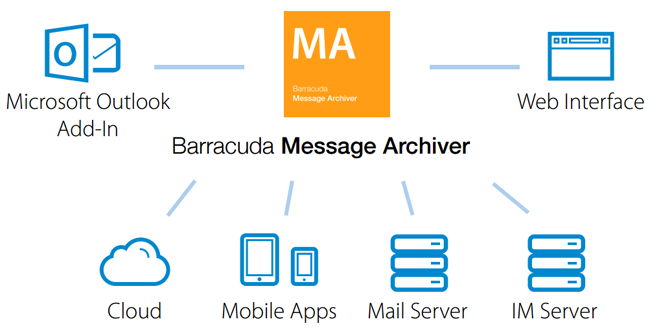
- Mobile applications for anytime/anywhere access
- Outlook Add-in for combined mailbox and archive search
- Automated discovery and import of PSTs
- Attachment and whole message stubbing
Product Spotlight
- All-in-one, cloud-connected message archiving appliance
- Improves mobile user access and productivity
- Eliminates need for PSTs
- Reduces email storage costs
- Federated Search simplifies eDiscovery and compliance
Cloud-Connected ArchivingThe cloud-connected Barracuda Message Archiver uses the Barracuda Cloud to move or copy data to the cloud. Setting policies in “mirror” mode replicates all data to the cloud for disaster recovery purposes. Setting the policy to “Rotate” mode allows the appliance to scale-up and use the cloud as a secondary tier of storage. |
|
Simplify Email ManagementUsers treat mailboxes as filing cabinets, driving expensive server storage to expand continually. They respond to storage limits by archiving messages locally with PSTs, which are not managed (or even seen) by IT. The Barracuda Message Archiver dramatically reduces demand for email server storage through attachment stubbing, message/ attachment deduplicaton, and compression, while also eliminating the need for PSTs. |
|
Streamline eDiscovery and ComplianceThe Barracuda Message Archiver's indexed archive supports extensive search, auditing/ permissions, legal hold, and export helping facilitate eDiscovery and retention. An intuitive interface and powerful feature set shortens response time to ensure messages are found easily when needed. Federated search lets users search across appliances and cloud-based data even when email services are unavailable. |
Deployment:
Users can search and retrieve archived messages anywhere, anytime.
Model Comparison:
| Microsoft Azure | Level 2 | Level 5 | Level 6 |
|---|---|---|---|
| Capacity | |||
| Container Size | A2 - Standard | A5 - Standard | A6 - Standard |
| License Type | BYOL Marketplace | BYOL Marketplace | BYOL Marketplace |
| Storage Capacity | 1 TB | 3 TB | 7 TB |
| Recommended Number of Users | 500 | 1,000 | 2,000 |
| Features | |||
| Comprehensive Archiving | |||
| Integrates with Office 365 | |||
| Federated Search and Retrieval | |||
| Granular Retention and Legal Hold | |||
| Integrated Cloud Storage | |||
| Exchange Stubbing | |||
| Reporting and Statistics | |||
| Policy Management | |||
| Intelligent Storage Manager | |||
| Roles-Based Interface | |||
| Folder Management | |||
| Mobile Apps | |||
| Stackable Appliances | |||
Technical Specs

Archiving
- SMTP messages, Exchange calendar, tasks and contacts
- Network crawling for PST import
- Reports: volume, storage utilization, violations, usage
- Mirror and extend storage to the cloud
- Stack multiple appliances for increased storage and deployment flexibility

Access
- Full-featured, robust mobile apps (iOS, Android)
- Outlook add-in
- Web interface
- Quickly restore messages with Resend to Me

Integration
- Exchange journaling
- Import from Exchange (MAPI)
- Import via IMAP and POP3
- Export via PST or EML
- Export to Copy (www.copy.com)
- Cloud email services (Office 365, Google Apps) via Cloud Relay
- Integration with LDAP

Virtual Appliance
- Hardened OS
- Common Hypervisor support, including VMware and Microsoft

Management
- Predefined roles
- Granular control for access and policy
- Domain-level auditor
- Standard and custom policies
– Foul language
– Personal email use
– Personally identifiable information - Violation alert digests
- Retention policies
- Legal hold

Message Search
- Full text search with multiple operators
- Metadata, contents, attachments
- Reusable saved search
- Tagging
- Federated search across appliances and cloud
- Reply to, forward and export messages

Efficiency
- Exchange stubbing
- Deduplication
- Compression
- PST consolidation
Support Options

Barracuda Energize Updates
- Standard technical support
- Policy definition updates
- Document definition updates
- Virus definition updates
- Security updates
Documentation:
Download the Barracuda Message Archiver for Microsoft Azures Data Sheet (.PDF)
Pricing Notes:
- Pricing and product availability subject to change without notice.