Cloud Video Gateway 330
Cloud Video Surveillance, Simplified

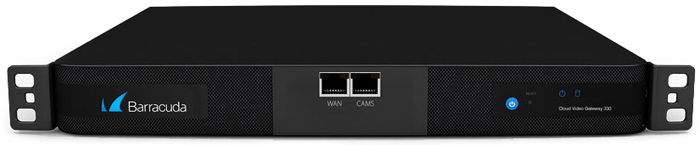
Sorry, this product is no longer available, please contact us for a replacement.
CudaCam Overview:
Do you already have your own video surveillance cameras? Leverage your existing investment by using the Cloud Video Gateway to connect your existing compatible cameras to a service plan for secure, cloud-based monitoring and archiving of surveillance videos.
The Cloud Video Gateway simplifies and strengthens video surveillance solutions by supporting local/cloud hybrid cameras, as well as a multitude of third-party cameras. Not only does it ensure ultimate flexibility, it’s also quick to setup and easy to customize so you can be up and running in no time.
The Advantage
- Enables CudaCam cloud management of third-party cameras
- Provides local video buffering, cloud video storage, and navigation
- Setup is quick and easy
Product Spotlight
- Enables you to mix, match and manage cameras of different brands, including PTZ and super high resolution
- Efficiently moves video to CudaCam Cloud Storage
- Allows ONVIF compliant cameras from other manufacturers to be managed through the CudaCam user interface
- Made in the USA
Cloud Video Gateway Key Features:
- Supports Most ONVIF (Profile S) Compliant Cameras
- Supports up to 16 Cameras at Up To 1080p Resolution
- Bandwidth Shaping for dynamic network utilization
- User Configurable Bandwidth Schedules for Efficient Operation and Night Time Video Uploads
- Live, Local Streaming Delivers Continuous Streaming Video over the LAN Without Using the Internet Connection
- Hybrid edge-cloud storage and playback
- Live streaming on demand
- IntelEvent Video Storage based on intelligent object tracking
- No Port Forwarding Required
- Video encrypted
- Simple 15-Minute Set Up
- Unlimited Users
- Role-based User Access
- Full-Featured CudaCam User Interface and Navigation
- Access Cameras and Recorded Events from any Web Browser
- Motion Alerts Based on User Configurable Schedules
- Automatic Offline Alerts if Network Connection Fails
- iOS and Android Apps
- Made in the U.S.A.
Benefits:
|
|
|
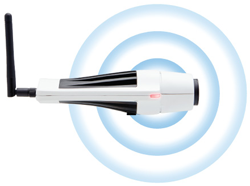
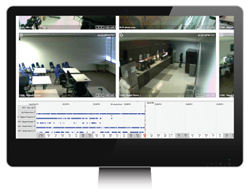
Specifications:
| Cloud Video Gateway Hardware Specifications | |
|---|---|
| Form Factor | 1U Mini |
| Dimensions | 16.8 x 1.7 x 14 in. |
| Weight | 12 lbs. |
| Input Current | 1.2 Amps AC |
| Ethernet Passthrough | 1 x Gigabit |
Technical Specs

Advanced
- Supports most ONVIF (Profile S) compliant cameras
- Supports up to 16 Cameras at up to 1080p resolution (each camera requires a CudaCam service plan for cloud management, video storage, user and camera administration, support, mobile apps and more)
- Bandwidth Shaping for dynamic network utilization*
- Video is 128-bit encrypted*

Professional Features
- Unlimited users*
- Role-based user access*
- Full-featured CudaCam user interface and navigation*
- Motion alerts based on user configurable schedules*
- Automatic offline alerts if network connection fails*
- iOS and Android apps included*

Efficient
- User configurable bandwidth schedules for efficient operation and night time video uploads*
- Live, local streaming delivers continuous streaming video over the LAN without using Internet connection*
- Hybrid edge-cloud storage and playback*
- Live remote and local streaming on demand*
- IntelEvent video storage based on intelligent object tracking*
- Access cameras and recorded events from any Web browser*

Simple Setup
- No port forwarding required*
- Simple 15-minute set up
* Denotes features shared with CudaCam cameras and service
CudaCam FAQ:
CudaCam is extremely secure. Captured video is encrypted and digitally signed on the MicroSD card, and it remains encrypted in motion and when stored in the VideoVault hosted in Barracuda’s secure cloud. The images can be viewed over a HTTPS connection.
Most importantly, the cameras do not connect directly to your network and therefore do not expose your network to external threats. Instead, cameras connect directly to the CudaCam service authenticate themselves. This outbound connection model prevents a huge class of security issues faced by facilities based solutions where end users connect directly to your video archive.
During normal operation CudaCam records video data in small, short spurts, and only when important activity occurs in that location. Without Bandwidth Shaping, or when you are live streaming, this data is immediately transmitted over the broadband connection. CudaCam video is less than 380kbps, so the minimum required bandwidth to support streaming is 380kilobits/second.
With Bandwidth Shaping (which needs a MicroSD Card installed), the small video segments are uploaded slowly at a low target bandwidth. In almost every video monitoring situation there is a lot of nothing going on. The average bandwidth a camera needs is very low - we set the cameras up at 30kbps (yes, 30 kilobits per second) and they rarely require more in normal operation.
A single CudaCam needs 380kbps minimum, which it will use occasionally. With Bandwidth Shaping, the same connection will support 8 to 12 cameras (if you are dedicating the link to the cameras).
The CudaCam application needs enough bandwidth to smoothly stream video - 380kbps. For best experience, you should have greater than 1mbps of download bandwidth.
CudaCam cameras capture representative images as well as full video of every important object that passes the camera. The images are aggressively compressed so viewing them requires very little bandwidth. Most of the real-time interaction between camera and service, and between service and your browser, is accomplished through these smaller images. Very little data has to be moved around until you select the video segment you want to look at - which translates into a fast user interface.
Bandwidth Shaping stores video and images on an onboard SD card at high speed, then slowly sends them to the service as bandwidth allows. This evens out the camera bandwidth demand, enabling installation of several CudaCam Cameras on you existing Internet connection.
Bandwidth Shaping allows most cameras to use less than 30kbps of uplink bandwidth. You can further configure Bandwidth Shaping to match your network needs.
Note that bandwidth shaping requires you install a Micro SD card in the camera. A 1GByte card will store about 6 hours of video, which is typically enough to time shift video across few days. Once you install the SD Card, you will probably have to format the card and enable the card under settings.
If you have enabled bandwidth shaping, CudaCam cameras will continue recording video and images (as long as there is electrical power) even if the Internet connection goes down. When connectivity is restored recorded, events will be uploaded to CudaCam.
In most cases, your CudaCam Camera will automatically recover from the outage when connectivity is restored, no action required on your part. If you want to help it along, after you have restored your network, power cycle the camera.
If it is an extended outage (> 10 minutes) you can get an alert from CudaCam (if enabled), telling you we have lost connection with your camera. The period of the outage will be marked in yellow in your time line.
You can change a number of settings associated with event capture. The easiest way is to select one of the preset modes to match your cameras imaging environment. This will set the options appropriately for typical situations. You also have fine grain control of object size, masks, and various exposure compensation parameters.
To use CudaCam Mobile, point your mobile browser at m.cudaeye.com. You may need to adjust the configuration for optimal performance and compatibility with your particular device - click on the configure button at the bottom of the CudaCam Mobile page.
You can download an MP4 copy of your video or JPEG of your images. The MP4s are compatible with YouTube, QuickTime, VLC, RealPlayer and other major media players. The JPEGs work with anything. To download, from the video player click "DOWNLOAD".
Your video and images are automatically saved. Whatever you see in the user interface is stored in the CudaCam server. Each camera subscription has an associated length of archive. Four weeks in the basic package. If you have something really important, mark it with a SAVED EVENT and it will be retained after the normal archive period expires. There are some limitations to this in the service agreement to prevent abuse.
If a recorded video event is needed for prosecution or other legal requirement, will provide the original, digitally signed, time and date stamped file to the you or your designee.
No. All you need to do is install your cameras in the location you desire and CudaCam will automatically find them for you. No server, no complications, just video intelligence.
Plug a CudaCam camera into a Power over Ethernet connection. The camera will automatically use your broadband connection to communicate with CudaCam. Log into your account and watch your video. It really is that easy.
We include a good zoom lens and a camera mount for both drop ceilings and screw mounts.
What are the requirements for a CudaCam Camera?
- A valid subscription to a CudaCam monitoring service plan.
- An Internet connection with at least 380kbps uplink bandwidth (can be shared by multiple cameras with bandwidth shaping enabled)
- Ability to connect to Internet HTTP addresses using one of the following ports: 80, 443 or 733. If you don’t understand this requirement, your network probably already meets it. Only very tightly controlled networks typically lock down outbound connections. If you are on one, you consult with your IT department before installing a CudaCam camera.
- A Power over Ethernet (PoE) port. CudaCam cameras are Power over Ethernet (PoE) devices using PoE Class 2 10/100 Base T. Power comes over the Ethernet cable itself, so there is only one connector. Any Ethernet cable will work, but you need a PoE port. You can make a regular Ethernet connection into a PoE connection with an injector or PoE switch. We sell these in the store or you can get one at most computer equipment retailers.
Documentation:
Download the Cloud Video Gateway Datasheet (PDF).